->

14 October 2007

Massive Live Local Maps and Imagery Updated

"Birds Eye views of dozens of cities around the world were added to the Virtual Earth platform last night. You can enjoy them at Live Search Maps or integrate them into your own applications with our Map Control. 10TB of new imagery went out in this release along with 28TB of refreshed street map tiles. The October imagery release is one of the largest for Birds Eye in a while, featuring coverage in Madrid, Stockholm, Copenhagen, plus 15 regions in the UK and US respectively (see below for full list) "


1 Terabyte = 1024 Gigabytes


(ensure 3D Virtual Earth Plugin is installed with IE7 before clicking the links)


Source:


http://virtualearth.spaces.live.com/Blog/cns!
2BBC66E99FDCDB98!9246.entry?action=post&wa=wsignin1.0

Labels: , , , ,

29 May 2007

192.com Mapping - High Resolution Images

192.com Mapping - High Resolution Images

192.com St_Paul's Cathedral Hi Res

More Mapping Competition from 192.com - with transitional action from the cartographic map to aerial imagery a nice implementation.

The main advantage with this is that the aerial imagery is constant across the UK.
Google Maps, Microsoft Live Local, Multimap mapping has patchy areas that are poor resolution in places.

On par with Micosoft Live Local resolutions however the tiles appear faster in 192.com with the added transitional effect makes the user aware of the fact that data is loading.
Data source is cities revealed and overview mapping.

Mapperz back in the UK

more information on this at Guardian Unlimited: Technology

Labels: , , , ,

16 April 2007

Get A Little Extra - Tesco Maps

Get A Little Extra - Tesco Store locater maps
Easy uncomplicated store and nearest stores locater, click on icons (markers) for the opening times, address and contact numbers.
Tesco Map
"Find Tesco store locations on a Virtual Earth map of the UK with an optional satellite image overlay. Hover the mouse over a location to get directions, or click on the name of the store to view its address, phone number and store hours."

http://www.tesco.com/storelocator

includes
  • Tesco Extra (the largest stores)
  • Tesco Express (small convenience stores)
  • Tesco Metro (food only small stores)

There are more out there than you think!

Uses Microsoft Virtual Earth,Live Local, Live Maps (enter another name here in two days).

"It's been named MSN Virtual Earth, Windows Live Local, Windows Live Maps, Live Search Maps and now Live Maps."
Official Source Virtual Spaces Blog


Mapperz

Labels: , , , , ,

04 April 2007

New Version of Live Maps Launches

A new version of Live Maps Launches (Live Local, Virtual Earth, Microsoft)

Firefox 3D Live Maps Microsoft Officially Supported
In Summary
  • Firefox support (officially supported) for 3D mapping (hooray)
  • Ratings and Reviews of Business Listings and Details page enhancements (USA Only)
  • Subscribe to a Collection via RSS.
  • Area Calculations and Drawing Enhancements
  • Traffic and Driving Directions Enhancements
  • Address-Only Geocoding
  • Live Search Maps for Outlook is Updated
  • Twitter 3D map in Virtual Earth (see link)

In detail here

Labels: , , , , ,

26 January 2007

LookLocal Maps (now beta 2)

LookLOCAL is an online mapping and location based search site. Access and compare data from Google Maps, Yahoo! Local Maps, and Live Search Maps. View over 6,000 traffic cams, import your own KML layers. LookLOCAL is becoming a personalised online mapping portal.

LookLocal Maps Google with Driving Directions

"We built the site to integrate the search results and data from the three main online map providers. The idea being that it provides the user with the best of all three through a single seamless interface. Thanks for pointing out the zoom box. I've seen those and they are helpful for navigating. The zoom tool on our site is a thin client version of our patented Pliable Display Technology. The idea behind this type of visualization is that you can view additional detail without zooming the bigger picture (your context) off of the screen.

LookLocal Maps Live Local with Driving DirectionsLookLocal Maps Yahoo Map with Driving Directions

The beta 2 version now includes traffic cameras (North America and the UK), listings for some of the world's favourite travel destinations, and the ability to represent multimedia files on a map.

A worthwhile look at the development labs to for:

  • LookOUT is a great new add-in for Microsoft® Outlook® that enables you to easily map a location or find directions straight from your Outlook Contacts window.
  • The new LookLOCAL toolbar extension for Firefox® allows you to map search results or find directions directly from your Firefox browser toolbar.
  • LookWMS is a PDT-enabled Java Web Map Client with several unique features that enable you to access maps from servers that implement the OpenGIS® WMS specification.

Mapperz

Labels: , , , , ,

23 January 2007

Oblique Aerial Photos & More 3D Buildings Windows Live Local / Virtual Earth

Some nice 3D Photographic Images coming from Microsoft is are making their way through Windows Live Local / Virtual Earth

High Res Oblique Aerial Monte Carlo
Monte Carlo


Textured 3D Buildings in Miami
Miami in 3D
(use IE7 with 3D Virtual Earth Plugin pre-installed)

Source: Virtual Earth Blog

Labels: , , , , , ,

01 December 2006

Windows Live Search for Mobile (Beta) with Maps

Windows Live Search and Local Search from your Mobile (Beta)

Windows Live Search Map TrafficWindows Live Search Map Directions

Windows Live Search Map SearchWindows Live Search Map

Service available through

http://mobile.live.com/search/

Download needed (Java and Windows Version)

Labels: , , , , ,

09 November 2006

Local Live does.... 3D Geocoding of UK Addresses

Mapperz reported back in August 2006 about UK Geocoding using Local Live and the permalink feature. This contains the Longitude and Latitude of the Centre of the Map.

UK Geocoding LIVE Local Virtual Earth

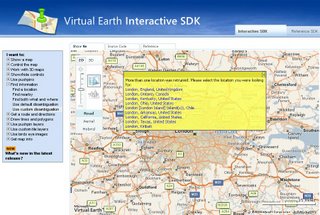
Now it is possible using the Virtual Earth SDK

Virtual Earth SDK
No live examples for the UK to date.

But here is a UK first, Geocoding Addresses in 3D using Virtual Earth 4

"10 Downing Street, London, UK"

simply enter the parameters:
http://local.live.com/?where1=10+Downing%Street+London+UK
then click permalink under Share>View Permalink
this creates a url:
http://local.live.com/default.aspx?v=2&cp=51.503391~-0.127411
&style=r&lvl=14&tilt=-90&dir=0&alt=-1000

notice the updated format that now contains longitude, latitude, zoom level, tilt, direction and altitude
So where is the geocoding in 3D?

Mapperz tried this in IE7 with the VE4 plugin pre-installed
http://local.live.com/default.aspx?v=2&cp=51.503391~-0.127411
&style=r&lvl=14&tilt=-25&dir=45&alt=500

so what if we parse the address with the 3D information will it work?

enter in local live
http://local.live.com/?where1=10+Downing%Street+London+UK
&style=r&lvl=14&tilt=-25&dir=45&alt=500
then click hybrid mode

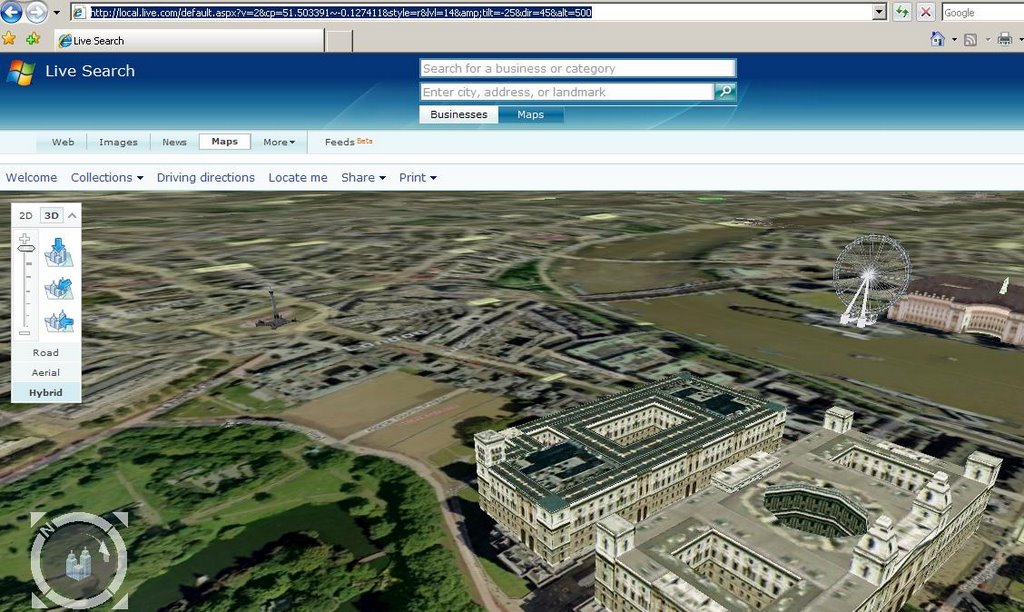
produces 3D UK Geocoding

Geocoding UK Addresses in 3D in Virtual Earth

Labels: , , , , ,

07 November 2006

Live Local - 3D London bits

3D London Local Live with Driving Directions
Live Local in 3D in London with driving directions.

The good bits:
Free, 3D Views with tilt (Ctrl+left mouse click)
Aerial Photography (orthorectified) is better than other app (google earth/maps, world wind, skyline globe etc)

The poor bits
It does not work in FireFox.
But is a bit clunky on a 2MB broadband connection (yes the hardware is accelerated to max).
Why the user needs to install plugins (that failed). Used VirtualEarth3D.msi to solve the problem.

Tips Navigate 3D maps with the mouse or keyboard
Pan the map

Choose any of the following options:

* Click one of the four directional arrows in the compass to pan the map in that direction.
* Click a point on the map, and then drag the map in any direction.
* Use the arrow keys.
Pivot the map

Choose any of the following options:

* Click on the ring of the compass, and then drag the ring in any direction.
* Press the CTRL key while you drag the map to the left or to the right.
* Press the CTRL key, and then press either the left or right arrow key.
Turn the map view

Choose any of the following options:

* Press the SHIFT key while you drag the map to the left or to the right.
* Press the SHIFT key, and then press either the left or right arrow key.
Tilt the map

Choose any of the following options:

* Drag the small slider inside the ring of the compass.
* Press the CTRL key while you drag the map up or down.
* Press the CTRL key, and then press either the up or down arrow key.
Change your pitch

Choose any of the following options:

* Press the SHIFT key while you drag the map forward or backward.
* Press the SHIFT key, and then press either the up or down arrow key.
Change your altitude

Choose any of the following options:

* Press the SHIFT key while you rotate the mouse wheel.
* Press the page up or page down key.

Zoom in or out on the map

Choose any of the following options:

* Rotate the mouse wheel forward or back.
* Press the CTRL key and rotate the mouse wheel forward or back to zoom toward or away from the pointer.
*
Press the hyphen (-) or the equal (=) key on the keyboard.

Labels: , , ,