Google Maps JavaScript API v3 - Now with Directions
Google Maps JavaScript API v3 - Now with Directions
**Remember Google Maps JavaScript API v3 is designed to be super lightweight for mobile devices
This makes mapping for mobile devices a lot more useful
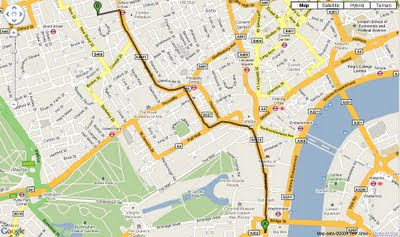
New Directions (Walking or Driving) in London - Google Maps V3
@mapperz example above
http://mapperz.googlepages.com/google_mapv3_directions.html
With a Directions Panel
http://mapperz.googlepages.com/google_mapv3_directions_panel.html
Code:
New required parameters
var directionDisplay;
var directionsService = new google.maps.DirectionsService();
Set Start and End locations:
function calcRoute() {
var start = document.getElementById("start").value;
var end = document.getElementById("end").value;
var request = {
origin:start,
destination:end,
Travel Modes:
travelMode: google.maps.DirectionsTravelMode.WALKING
travelMode: google.maps.DirectionsTravelMode.DRIVING
Get the response from the Geocoder if both locations geocoded then display route between locations:
directionsService.route(request, function(response, status) {
if (status == google.maps.DirectionsStatus.OK) {
directionsDisplay.setDirections(response);
See the changelog
http://code.google.com/p/gmaps-api-issues/wiki/JavascriptMapsAPIv3Changelog
revelant links
Official documentation
http://code.google.com/apis/maps/documentation/v3/reference.html#DirectionsRenderer
http://code.google.com/apis/maps/documentation/v3/reference.html#DirectionsService
Offical Examples:
http://code.google.com/apis/maps/documentation/v3/examples/directions-simple.html
http://code.google.com/apis/maps/documentation/v3/examples/directions-panel.html
source:
http://groups.google.com/group/google-maps-js-api-v3/browse_thread/thread/ee7ce7cf8a872268?hl=en#
Labels: Directions, Driving, Google Map API, Lightweight, Mobile, v3, Walking
posted by Mapperz @ 4:02 pm
1 comments


![MBR [Minimum Bounding Rectangle] Example](https://blogger.googleusercontent.com/img/b/R29vZ2xl/AVvXsEiCoiJKK0PT6q037FnJEbBPs-c5nZ56rrzgTlWPPmJgSq8t1-LU8lVAkr7A2ki5aydfSe-wZeAo59i_KK6K35xKmsm4xIKnuD8HpapXgeVsps2R_pVbvzUCc48qiQuymM1MZdHj/s1600-h/MBR_Example.bmp "MBR [Minimum Bounding Rectangle] Example")





