What's New in ArcGIS 9.3?ArcGIS 9.3 is expected to be available in the
third quarter of 2008.
ArcGIS DesktopThe new Convert Graphics to Features dialog at ArcGIS 9.3
A new Convert Graphics to Features dialog has been added to allow you to create features by drawing graphics without using the editor.
For this function now go
here ( Tools for Graphics and Shapes v. 1.1.76).
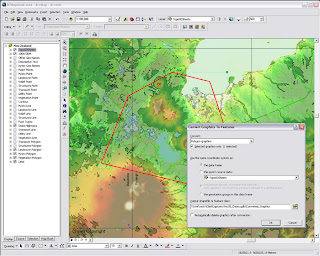
ArcGis 9.3 - Converting graphics to shapes
Pause LabelingA new button in the Labeling toolbar lets you temporarily pause labeling to increase performance while you assemble the other layers in your map or do analysis. This saves you having to turn labeling off completely.
Manage BookmarksBookmarks are much easier to access. You can also re-order and sort them, and export and load them between different data frames, maps and globes.
"Bookmarks are easier to access with the new Bookmarks pulldown menu. The 9.3 Bookmark Manager dialog lets you reorder bookmarks anyway you want and save bookmarks to a file for loading into other data frames, maps or globes. You can update the extent of an existing bookmark without having to recreate it. You can also save bookmarks into your My Places dialog so you can use the same bookmark in any map or globe you work with."Data View and Layout SynchronisedLayer legends in the Table of Contents (TOC) and on your map layout automatically use lighter colors for symbols in layers that have transparency applied to them.
Full Table JoinsWhen you join tables, all of the field properties & field aliases, are now retained which makes working with joins much easier. You can now perform joins between layers or tables with definition queries defined and the definition queries are respected correctly.
There is now a toggle between showing field name aliases and showing the underlying field names. You can also sort a table on multiple attributes.
Full Identify AttributesIdentify window, the dialog will now respect all the field properties, such as primary display field, field aliases and field visibility, of any layer or table in your map that represents that related data in your map. Also when you identify a feature, you can now immediately launch the properties dialog and attribute table of the layer that the feature belongs to directly from the Identify window. This saves you having to look for a specific layer in the Table of Contents and is particularly useful when your map contains a large number of layers.
Address Geocoder and Reverse GeocoderThe new Address Inspector lets you click on a map to get the nearest address to any location
A new reverse geocoding tool called the Address Inspector lets you click on a map to get the nearest address to any location, and you can add that address to the map as a label.
Export & Clip Raster DataIt is now easier to export raster data. A new option within the Export Raster Data dialog in ArcMap lets you
clip the output raster to the extent of the selected graphic(s) on your map.
Relative Scale Bar (1 in = 5 miles)
In 9.3 you can customize the scale control so that scales are always reported in relative format.
There is a now way to display map scales throughout the ArcMap user interface in relative format, such as 1 in = 5 mi, in the units of your choice, making scales easier to understand.
Double click Layer File (opens ArcMap)
Layer files are now registered with the ArcGIS Desktop applications. Double-click LYR files in Windows Explorer, Outlook, Windows Desktop to add them into your current map or launch ArcMap if it is not already running.
You can also click on LYR files presented on Web pages to add them into your maps, which provides internet data publishers with a simple way to provide ArcGIS Desktop users with access to their map services.
New Cartographic ToolsWYSIWYG (What You See Is What You Get) editing of cartographic representations has been added. When moving representations on a map, you'll be able to see the symbology instead of the wireframe outline so that you can better see how the edit will impact your map.
The new representation marker dispersal tool reduces the complex one-to-many relationship to a simple dynamic map
New Geoprocessing Toolshave been added to help with cartographic production.
Disperse Markers has been added to allow you to spread representation markers apart which are coincident or nearly coincident. The new
'Set Representation Control Points at Intersect tool', you can now add a control point where coincident features share vertices.
New geometric effects
Move, Rotate, Scale, Wave, Tapered Polygon, and Regular Polygon.
*When exporting to XML, there is more information available about cartographic representations & rules.
Enhancements to Geoprocessing.Within ModelBuilder, variables are more flexible in models and the '
Feature Record Set' and
'Record Set Controls' have been improved. More control over your geoprocessing model's parameters such as if a parameter is optional or required and what variable values are acceptable as inputs.
Script tools can now have multi-value outputs. The Results Window now shows environment settings. The Python scripting experience has also been improved. Python can now be run within an ArcGIS process.
**
Error messaging has been revamped to make errors more descriptive and better linked to the help system. Messages are now standardized across all products, including ArcGIS Desktop extensions. These new, more informative messages will make it easier to build scripts and models.
Tool progress
messaging has also been improved and now more accurately displays actual progress. Not only will you be able to see how long an operation will take, but you'll know if the operation is proceeding as planned and not in some unknown state.
The
'Near' tool has been made more flexible and will now work with more than points and lines.
It will perform calculations to all features within a given search radius. The ability to join to the closest feature has been added to the Spatial Join tool, making it easier to merge attributes.
New Spatial Statistics Tools
A new
'Generate Spatial Weights' tool in 9.3 gives you a new way to model spatial relationships. Its use results in a spatial weights file that is re-usable, editable, and sharable. A new
'Ordinary Least Squares Regression' (OLS) tool help you decide if your data is suitable for analysis using a global model that is the most commonly used regression statistic. The new
'Geographically Weighted Regression' (GWR) tool uses a local model for regional variations and helps you understand how processes vary of space.
ArcGIS Server
- On-demand caching and improved caching geoprocessing tools will allow you to create faster mapping services.
- New image services will let you quickly publish imagery that is optimized for the Web.
- Precise logs will enable you to easily identify bottlenecks and points of failure and improve your installation and configuration experience.
- New options in Manager will make it easier for you to secure Web services and Web applications
More documentation
Major additions have been made to the
online help and SDK documentation.
A new
ArcGIS Server Resource Center brings together the set of online resources to help make you successful including blogs, samples, and best practices information.
Mapping APIArcGIS Server 9.3 also introduces several important new features:
New REST and JavaScript APIsThese APIs will dramatically simplify your development experience and enable you to deliver fast and
user-friendly mashup GIS Web applications.
***The JavaScript libraries will also let you embed ArcGIS Server maps, geocoding, and geoprocessing services into
Google Maps API and
Microsoft Virtual Earth API.
OGC and industry standards
New Open Geospatial Consortium (OGC) services support
Additional support for OGC and industry standards, such as Web Coverage Service (WCS), Transactional Web Feature Service (WFS-T), and KML 2.1, will improve your ability to integrate with virtually all the commonly accepted GIS and IT standards.
New PostgreSQL support - thank you ESRI! :)(This gives you the ability to store and manage spatial information in this open source database system without ArcSDE.)"The 9.3 release of ArcGIS Server represents a complete and integrated server-based GIS with significant quality enhancements and several new features that will make it even easier for you to create and manage end-user applications and services for spatial data management, visualization, and spatial analysis."The GeodatabaseThe geodatabase continues to be the common data storage and management framework for ArcGIS. At ArcGIS 9.3, the geodatabase offers improved spatial data management and enhanced capabilities for integration with enterprise systems.
ArcGIS 9.3 geodatabase enhancements include:- Raster data management. New geoprocessing tools make the transfer of unmanaged raster catalogs (in Microsoft Access personal geodatabases and file geodatabases) from one location to another much easier
- Geodatabase replication. Microsoft Access personal geodatabases and file geodatabases can participate in one-way replication as child geodatabases
- ArcGIS 9.3 allows for more detailed logging of geodatabase replication activity.
Direct Connect backward compatibility (clients will be happy)ArcGIS 9.3 clients can make direct connections to pre-9.3 enterprise geodatabases (e.g., 9.2, 9.1, and 9.0).
Backward compatibility allows easier implementation of phased migration strategies for new ArcGIS releases.
Versioned editing
The Merge Geometries option enhances conflict and reconcile management.The Version Changes Viewer tool allows a version to be compared with an ancestor version without performing a reconcile operation.
Support for PostgreSQL (Open Source DBMS)Enterprise geodatabases can be implemented on PostgreSQL with full support of the geodatabase data model.Vector geometry is stored in the ESRI spatial type.
PostGIS Open Source spatial type is supported.
Support for SQL Server 2008The SQL Server 2008 release will introduce two spatial types: Geography and Geometry. These will be supported in enterprise geodatabases implemented on SQL Server 2008.
Operating SystemNew 64-bit platform support
Enterprise ArcSDE technology is now available as a native 64-bit application for Windows and Linux.
Source:
ESRI (
Mapperz edited for this post)
Labels: 9.3, ArcGIS, New Features, Postgres, SQL, Support, What's New





